Using iAds While Maintaining Backwards Compatibility

11
June 27, 2010

iAds are going to be all over apps in the AppStore in just a few short weeks as developers try to make some money from the average iPhone user. The only problem is that you won’t make any money unless the user is running iOS 4.0. Versions of the iOS prior to this don’t have the iAd framework and therefore can’t display ads. So what’s a developer who wants a few clams to do?

Here’s my suggestion if you’re really that concerned about making money:

  • Target your app at iOS 3 (unless your analytics show heavy iOS 2 usage, it’s time to leave them).
  • Limit a few “pro” features in the iOS 3 version that can be unlocked with a minimal in-app purchase.
  • Once your app is ready, weak link the iAd framework, enable iAds in your app, and use intelligent conditional checks when writing iAd code.

Hopefully since you’re choosing to use ads while under iOS 4, you won’t charge to download your app and all features of your app will be unlocked when displaying ads.  It still might be appropriate to create an in-app purchase that disables advertisements.  Just don’t take advantage of your users to line your pockets.

Unfortunately, you can’t use Interface Builder to add the ADBannerView object so you must generate the element programmatically.  Remember to weak link the iAd framework by selecting the appropriate target in the Groups and Files pane and then change “Required” to “Weak” for iAd.

/* YourViewController.h */
#import <iAd/iAd.h>
 
@interface YourViewController : UIViewController
{
	ADBannerView *adView;
	BOOL bannerIsVisible;
}
 
@property(nonatomic, retain) ADBannerView *adView;
@property(nonatomic, assign) BOOL bannerIsVisible;
 
/* YourViewController.m */
@synthesize adView;
@synthesize bannerIsVisible;
 
- (void)viewDidLoad
{
	[super viewDidLoad];
 
	static NSString * const kADBannerViewClass = @"ADBannerView";
	if (NSClassFromString(kADBannerViewClass) != nil) {
		if (self.adView == nil) {
			self.adView = [[[ADBannerView alloc] init] autorelease];
			self.adView.delegate = self;
			self.adView.frame = CGRectMake(0, -50, 320, 50);
			self.adView.currentContentSizeIdentifier = ADBannerContentSizeIdentifier320x50;
			[self.view addSubview:self.adView];
		}
	}
}
 
#pragma mark -
#pragma mark ADBannerViewDelegate Methods
 
- (void)bannerViewDidLoadAd:(ADBannerView *)banner
{
	if (!self.bannerIsVisible) {
		[UIView beginAnimations:nil context:NULL];
		banner.frame = CGRectOffset(banner.frame, 0, 50);
		[UIView commitAnimations];
		self.bannerIsVisible = YES;
	}
}
 
- (void)bannerView:(ADBannerView *)banner didFailToReceiveAdWithError:(NSError *)error
{
	if (self.bannerIsVisible) {
		[UIView beginAnimations:nil context:NULL];
		banner.frame = CGRectOffset(banner.frame, 0, -50);
		[UIView commitAnimations];
		self.bannerIsVisible = NO;
	}
}
 
- (void)dealloc
{
	self.adView.delegate = nil
	self.adView = nil;
 
	[super dealloc];
}
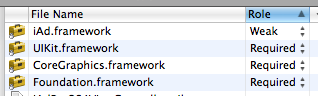
Weak Linking iAd Framework

Don't forget to weak link the iAd framework!

Nothing special needs to be done about your interface file (.h).  Think about it: at compile time, the preprocessor directive importing the iAd interface defines the interface ADBannerView.  Because we weak link the framework, the compiler won’t complain about the implementation not being around for the 3.0 target.  You also don’t need to worry about doing checks for the ADBannerView class in the delegate methods, they’ll only get called if adView is instantiated and sets YourViewController as the delegate.

Remember to set your Base SDK for to iOS 4 and your Deployment Target to the lowest iOS version you want to support, or you did all this for naught.


Posted in: Technology | Tags: , , , , ,


11 comments for this post.

  1. Carol
    30 June 2010, at 10:32 pm

    Please tell *HOW* to set the weak/required linking … not just “remember to go do it”.

    How?

    I don’t see any “role” or any “weak” or any “required” anywhere near any of my frameworks.

  2. Greg
    03 July 2010, at 10:07 am

    @Carol: Select the Target from the Groups and Files pane in Xcode. On the right side of the screen after selecting, it lists all the Frameworks used in your project (it will look like the screenshot I posted). Then change “Required” to “Weak” next to iAd.framework. You can also just add “-weak_framework iAd” to your linker flags. For more info, see the Apple Developer Documentation link in my post about weak linking frameworks.

  3. JerryBeers.com » Blog Archive » Using iAds While Maintaining Backwards Compatibility
    11 July 2010, at 06:24 pm

    [...] Great post from Greg Fiumara about using iAds and still deploying to pre-iOS4 devices. Read More [...]

  4. tylerweitzman
    16 July 2010, at 08:51 pm

    I followed the instructions and the ads do show up on an iOS4 device but when I put it on an iOS3 device it doesn’t crash but the ads don’t show up either. Is it meant to be like that? Is there any way to have the ads show up on a iOS3 device.

  5. Rosco
    17 July 2010, at 05:53 am

    Great article Greg.

    The app store rejected my app twice for not implementing iAds correctly and it seems like you might have saved the day with your clear instructions.

    Cheers.

    Rosco

  6. Greg
    22 July 2010, at 09:06 pm

    @tylerweitzman Yes, that is the expected behavior. The underlying iAd framework did not exist until iOS 4 so the ads cannot be displayed on anything < iOS 4. This post was simply a means to tell you how to use iAds while on iOS 4 but not shut out your users who haven’t upgraded and are stuck with iOS 3.

    You all might also want to check out AdWhirl. I’ll probably be posting about it soon, as I’m pretty fed up with iAd’s performance.

  7. Ali
    27 July 2010, at 06:15 am

    I was looking for this on the web and found your post, really well done mate!
    Not just this post, the whole blog is great!
    Keep up the good work!!

    Cheers,
    Ali

    http://twitter.com/outofthebit

  8. Alex
    07 October 2010, at 06:57 pm

    Hello,

    I’m trying to set iAd in bounds of AdWhirl for 3.x iOS and 4.x iOS.
    I’ve done all steps:
    Week link + building app without AdWhirlAdapterIAd files is processed successfully
    Target OS is 3.0 and Base OS is 4.0.
    But when I try to add these files with additional conditions where ADBannerView appears, it couldn’t find items from iAd lib:

    “_ADBannerContentSizeIdentifier320x50″, referenced from:
    _ADBannerContentSizeIdentifier320x50$non_lazy_ptr in AdWhirlAdapterIAd.o
    ld: symbol(s) not found”

    What I can missed? What do you mean with “Limit a few “pro” features in the iOS 3 version that can be unlocked with a minimal in-app purchase.”?

    Looking forward for receiving answer
    Thanks
    Alexandra

  9. Greg
    09 October 2010, at 02:00 pm

    @Alexandra: Haven’t seen that before, make sure you have imported everything you need from AdWhirl. Start over perhaps, I know AdWhirl bundles a step-by-step PDF instruction guide on using the service.

    As far as limiting features, that was just my concept of how you might capitalize with an iPhone app. You’re certainly free to do what you want.

  10. Patty
    26 February 2011, at 12:33 am

    What’s the difference between:
    A> adView.delegate = nil;
    B> self.adView.delegate = nil;

    What’s the difference between:
    C> self.adView = [[[ADBannerView alloc] init] autorelease];
    C> self.adView = nil; // in dealloc

    D> self.adView = [[ADBannerView alloc] init];
    D> [self.adView release]; // in dealloc

  11. Greg
    26 February 2011, at 06:35 pm

    ‘self’ simply refers to the object (see here). The modern Obj-C runtime no longer needs these ivars declared as well, so this code segment could use an update.

    There’s been debate about using ‘foo = nil’ in destructors. The ideal syntax has been shown to be ‘[foo release], foo = nil;’

Post a Comment!

Your email is never published or shared. Required fields are marked *