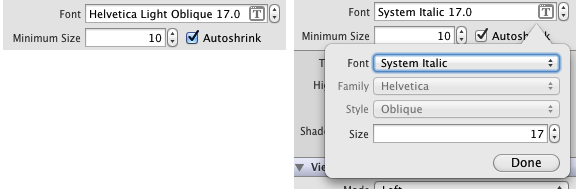
I noticed some UILabels in my iOS projects would disappear when run under iOS 4.3 after I upgraded to the Xcode 4.2 final revision with the GM iOS 5 SDK. I noticed that all the labels that were missing were in italics. Then I saw the reason out of the corner of my eye. Somehow in the Xcode 4.1 to 4.2 project conversion, the font properties on my labels were changed from System. Changing them back to “System” (or specifying the Helvetica family) fixes the invisible label. Note that in this case, iOS 5.0 did add “Helvetica Light Oblique” as a font choice.
Posted in: Other | Tags: ios, ios4, ios5, xcode, xcode 4.2
4 comments for this post.
23 October 2011, at 10:14 pm
I just got bit by this myself. Thank you for posting!
23 November 2011, at 03:28 pm
I created a brand new project, just a test, and the only options for font are System… I cannot select Helvetica, or anything else. I am sure I am just missing something, but I did not have this issue before. I was able to easily select any font. Note, UILabel, using ARC, universal app.
25 November 2011, at 07:49 pm
@Todd: In the XIB editor, if you set the Font menu to Custom, the other menus for Family and Style become enabled. You can also set them in code. It might make a difference to say the project in question was originally created under Xcode 3 before being migrated to Xcode 4.
02 February 2012, at 06:12 pm
Thanks a ton! Ran into this issue as well because I was using Helvetica neue. I just check for iOS 4 and change the font to regular Helvetica in code and that fixed it.
Post a Comment!
Your email is never published or shared. Required fields are marked *